
https://odtutor.com/simulators/pendulum-waves-orbits-collisions-electric-fields.html
Physics has always been one of those subjects that separates students into two camps — those who get it, and those who feel like they are staring at a foreign language written in chalk. The irony is that physics is not abstract at all. It is everywhere: in the swing of a playground pendulum, the crash of two billiard balls, the orbit of a satellite, the invisible forces that hold charged particles together. The problem was never the subject itself. The problem was how it was being taught.
For decades, physics education relied on a combination of textbook diagrams, chalkboard derivations, and the occasional real-world demonstration. These methods work — up to a point. But they ask students to take something fundamentally visual and dynamic and compress it into static equations on a page. That is where interactive physics simulators change everything.
The Gap Between Equations and Understanding
When a student sees the formula T = 2π√(L/g) for the first time, they are told it represents the period of a pendulum. They may memorize it. They may even solve problems using it correctly. But do they truly understand it? Do they feel, intuitively, what happens when you double the length? Or when you are on the Moon, where gravity is a sixth of Earth’s?
That intuitive understanding — what educators call conceptual understanding — is what traditional teaching often fails to build. Research in physics education consistently shows that students can pass formula-based exams while holding fundamental misconceptions about how the physical world actually works. They know the map but have never visited the territory.
Interactive simulators hand students the keys to the territory.
What Interactive Physics Simulators Actually Do
An interactive simulator is not a video or an animation you passively watch. It is a live, physics-accurate environment where you change the inputs and instantly see the outputs respond. You are not being told what happens — you are discovering it yourself.
This distinction matters enormously. When learning is driven by self-directed exploration, it engages a different and deeper part of the brain. Students form their own hypotheses, test them, get immediate feedback, and revise their thinking. This is the scientific method itself, embedded into the learning experience.
Our free physics simulator covers five core areas of classical physics, each built with real equations running underneath. Here is what students, teachers, and curious learners can explore.
1. The Simple Pendulum — Motion and Energy in Harmony
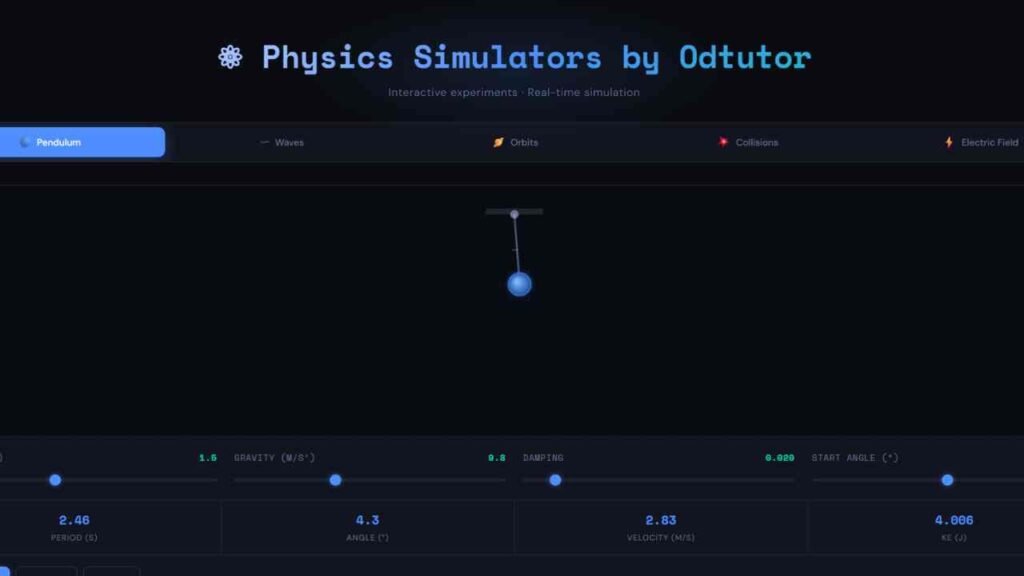
The pendulum simulator lets you adjust the length of the string, the strength of gravity, the damping coefficient, and the starting angle — all in real time. As you move the sliders, you watch the pendulum respond instantly. The period display updates live. The kinetic energy readout pulses with every swing.
Educational benefits: Students discover for themselves that the period depends on length and gravity, but not on the mass of the bob — one of the most counterintuitive results in introductory physics. They can simulate swinging a pendulum on Mars (gravity 3.7 m/s²) versus Jupiter (24.8 m/s²) and see how dramatically the period changes. The damping slider brings in the real-world concept of energy loss, connecting ideal theory to actual physical systems. The motion trail feature makes the arc of oscillation visible and memorable.
2. Wave Interference — Seeing the Invisible
Sound, light, water ripples — waves are everywhere, yet they are notoriously difficult to visualize from equations alone. The wave simulator displays two independent waves and their superposition (the combined result) in three distinct colors, all animating in real time.
Students can adjust the frequency and amplitude of each wave separately and watch the interference pattern evolve. They can switch between traveling waves and standing waves with a single click.
Educational benefits: The concept of constructive and destructive interference clicks immediately when students see it happening. Beat frequency — the pulsing you hear when two musical instruments are slightly out of tune — becomes tangible when students watch the combined wave swell and shrink as two frequencies drift apart. This simulator builds the visual intuition that makes topics like acoustics, optics, and quantum wave functions far less intimidating down the line.
3. Gravitational Orbits — Kepler Comes Alive
Few things in physics feel as majestic as planetary motion — and few things feel as distant from a classroom. The orbital simulator places a star at the center and lets you control the mass of the star, the initial velocity of an orbiting planet, and the time scale of the simulation.
Increase the orbital velocity and watch the path shift from elliptical to nearly circular. Push it further and the planet escapes into a hyperbolic trajectory — the simulator even labels the orbit type in real time. You can add moons that orbit the planet while the planet orbits the star, creating a miniature multi-body system.
Educational benefits: Kepler’s laws stop being abstract rules to memorize and become observable patterns. Students see directly that a larger orbital radius produces a longer period. They witness how a more massive star creates stronger gravitational pull and tighter orbits. The escape velocity concept, notoriously hard to convey with equations alone, becomes experiential: students simply slide the velocity up until the planet flies away.
4. Collisions and Momentum — Conservation in Action
The collision simulator places two objects on a track and lets you set their masses, initial velocity, and coefficient of restitution — a value between 0 and 1 that controls how elastic the collision is. At e = 1, the collision is perfectly elastic and kinetic energy is conserved. At e = 0, the objects stick together in a perfectly inelastic collision.
After the collision, the simulator displays momentum before and after, alongside kinetic energy before and after, so students can verify conservation laws with their own eyes.
Educational benefits: Momentum conservation is one of the foundational principles of physics, yet students regularly struggle to feel why it must be true. When they see that regardless of mass ratio, initial speed, or elasticity, the total momentum before always equals the total momentum after — it stops being a rule they follow and starts being something they trust. The comparison of kinetic energy before and after also makes the distinction between elastic and inelastic collisions viscerally clear.
5. Electric Fields — Visualizing the Invisible Force
The electric field simulator is perhaps the most visually striking of the five. Two charges sit in a field, connected by glowing field lines that arc and curve based on the sign and magnitude of each charge. You can drag either charge anywhere on the canvas with your finger or mouse, and the field lines redraw in real time.
Switch one charge from positive to negative and the field lines reverse. Make both charges positive and watch the lines repel outward, refusing to connect. The Coulomb force, distance between charges, and interaction type (attraction or repulsion) update live at the bottom.
Educational benefits: Electric field lines are one of the most powerful conceptual tools in electrostatics, yet students often encounter them only as static diagrams in textbooks. Being able to drag charges and watch the field reorganize builds spatial intuition that carries directly into understanding capacitors, conductors, and eventually electromagnetic waves.
Who Is This For?
These simulators are built for everyone who encounters physics — from a curious 14-year-old opening a browser at home, to a university student preparing for an exam, to a teacher looking for a demonstration tool that requires no lab setup, no equipment, and no budget. They run entirely in the browser, load instantly, and work on mobile devices too.
The goal is not to replace textbooks or lectures. It is to give concepts a place to live — a space where they can move, respond, and breathe — so that when a student returns to their equations, the symbols carry weight. They are no longer describing something abstract. They are describing something the student has already seen, adjusted, and understood.
Try the Simulator Now
You will find the interactive physics simulator embedded on this page. No login, no download, no setup. Just open it, pick a simulation, and start exploring. Drag the sliders. Change the values. Ask your own questions and let the physics answer them.
Because that is what physics has always been — not a collection of formulas to memorize, but a language for describing the world you already live in.